

Installation Options for Industrial Monitors
Rear Mounting Installation

Front Mounting Installation

Front and Rear Mounting Installation

VESA 75/100 Mounting Method
Open Frame Monitors are a type of industrial display with a special design, specifically designed to be integrated into other industrial terminals, electrical control cabinets, special devices or vending machines, interactive kiosks. The advantage of Open Frame Monitors is that they can be easily built into and integrated into other systems or designs. This allows manufacturers and developers to create customized solutions for their own applications or products.
Rear Mounting Installation
Open frame industrial monitors are usually mounted on a panel or frame in front of the display (rear mounting), using appropriate mounting brackets.
Our Open Frame Monitor products can be fitted into a cutout of the appropriate size, so that the display can be flush with the surface to be installed thanks to the bezel-free design of the monitors. Therefore, these monitors usually require additional protection during the final installation process or depending on the application. They are often installed in their own protective housing or embedded system, which is suitable for the given environment and application.
Open Frame Monitors are available in various display sizes and technologies in our product range, with PCAP and resistive touchscreens or non-touch screens, in sizes from 8" to 55". These monitors typically offer a high degree of customization in terms of interfaces, connectors, and other features to meet the specifications of a given application.
Our Open Frame Monitor products can be fitted into a cutout of the appropriate size, so that the display can be flush with the surface to be installed thanks to the bezel-free design of the monitors. Therefore, these monitors usually require additional protection during the final installation process or depending on the application. They are often installed in their own protective housing or embedded system, which is suitable for the given environment and application.
Open Frame Monitors are available in various display sizes and technologies in our product range, with PCAP and resistive touchscreens or non-touch screens, in sizes from 8" to 55". These monitors typically offer a high degree of customization in terms of interfaces, connectors, and other features to meet the specifications of a given application.
Front Mounting Installation
Front mounting is widely used by manufacturers as an installation option not only for industrial monitors, but also for industrial panel PCs, as this installation method is simple to use, does not require additional frames, additional drilling, welded threaded rods or sleeves for mounting. Thanks to the wider front panel, there is no need for precise cutting. The mounting is done with snap-in mounting tabs, which, after screwing, fix the monitor to the front panel. These industrial monitors have a sponge garden, so the front panel protection of the mounted monitors meets IP65 protection, and some types also IP66-IP67 protection.
Resolving External Dimension Differences Between Manufacturers
Industrial monitors with the same display size, as our manufacturer, have unique external (installation) dimensions, so in the event of a replacement, it often happens that an industrial monitor with the same display size does not fit into the given cutout. Front mounting monitors can still be installed with a smaller size difference, larger size differences can be properly resolved by modifying the cutout or using an intermediate adapter plate.
VESA 75/100 Mounting Method
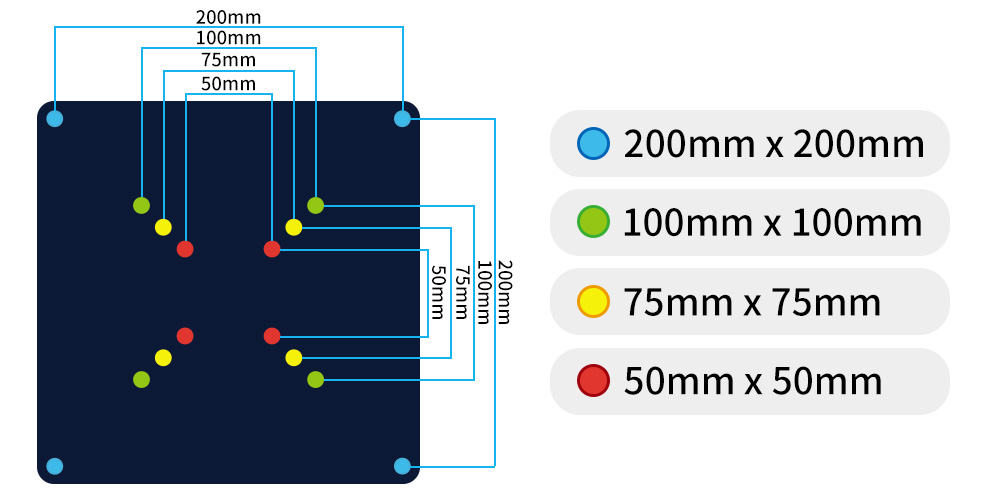
Our industrial monitor product line has a VESA 75/100 mounting option, so these monitors can not only be built-in, but can also be mounted on any VESA 75/100 mounting bracket. Our industrial monitors can be mounted with a screw mounting located at a VESA 75, 75 mm hole spacing, or with a screw mounting located at a VESA 100, 100 mm hole spacing.

Bezel Free Monitor Design
Many industrial touch screen monitors have a "traditional" design, which means that the touch surface of the display and the front panel are not in the same plane, which can typically cause inaccuracy when touching at the edges of the display. This is especially typical of resistive touch screen industrial monitors. This is eliminated by the bezel free industrial monitor design, which is in the same plane outside the entire display and touch surface, so touch errors can be minimized, and the industrial monitor is easier to clean, dirt, dust, metal particles, moisture do not accumulate in the corners of the display, and it is more resistant to moisture and dust.